Trial Balance
This guide explains the Trial Balance report of MyCloudBook: how to open it, how to choose the period, how to read the debit and credit movements of the accounts and the totals, and how to print the report or download it as an Excel file.
Overview
The Trial Balance lists the accounts of the company with their debit or credit amounts and the totals of the two columns. When every journal entry is balanced, the total of the debits equals the total of the credits. Accountants use the report to check the books before they prepare the financial statements.
The MyCloudBook Trial Balance shows the net movement of every account between the From Date and the To Date: the debits minus the credits of the posts of the period, written in the Debit or the Credit column. The report reads the journal posts of every posted document, such as invoices, receipts, bills, expenses, payments, transfers, and journal entries.
The Trial Balance is one of the four Standard Accounting Reports, with the Balance Sheet, the Income Statement, and the Cash Flow Statement.
How to open the report
- In the left navigation, click Reports. The Reports tab lists the reports in four groups.
- In the group Standard Accounting Reports, double click Trial Balance.
- The report opens in its own tab and is created at once with the default settings. When the tab is open already, it becomes the active tab and keeps its settings.
A report tab can be closed with its x. The next double click opens the report again with the default settings.
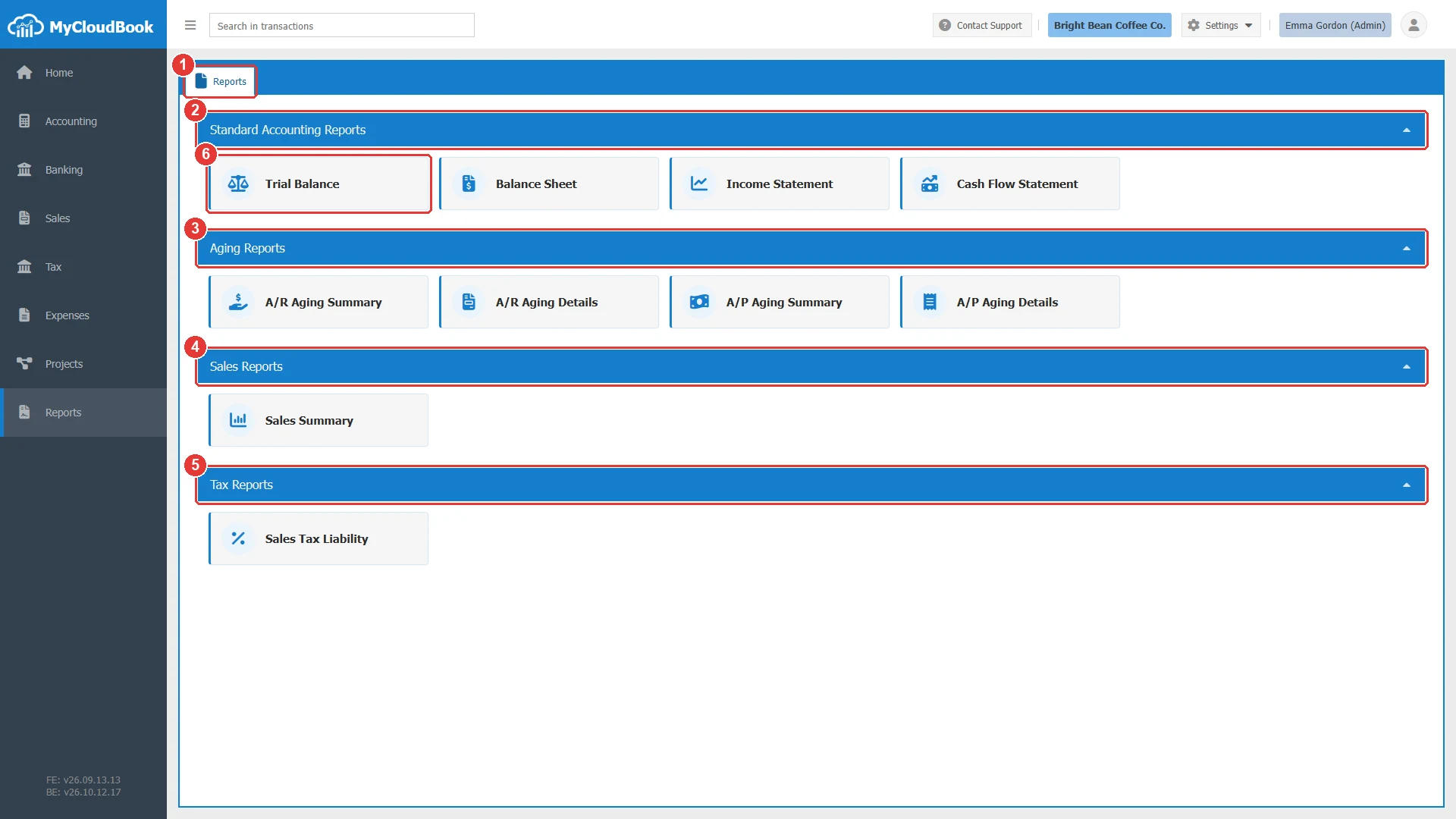
- 1The Reports tab. It is always the first tab of the Reports page.
- 2Standard Accounting Reports: Trial Balance, Balance Sheet, Income Statement, and Cash Flow Statement. A click on the title of a group hides or shows its reports.
- 3Aging Reports: A/R Aging Summary, A/R Aging Details, A/P Aging Summary, and A/P Aging Details.
- 4Sales Reports: Sales Summary.
- 5Tax Reports: Sales Tax Liability.
- 6A report, here Trial Balance. A double click opens it.
The report screen
The report screen has two parts. The center shows the report as a Portable Document Format (PDF) document in the PDF viewer of the browser. The Report Setting panel at the right holds the settings of the report. After a change of the settings, click Reload to create the report again. The arrow in the header of the panel hides the panel, so the report gets more room.
The example shows the first nine months of 2026 of the example company Bright Bean Coffee Co.: the To Date was changed to Sep 30, 2026, and Reload was clicked.
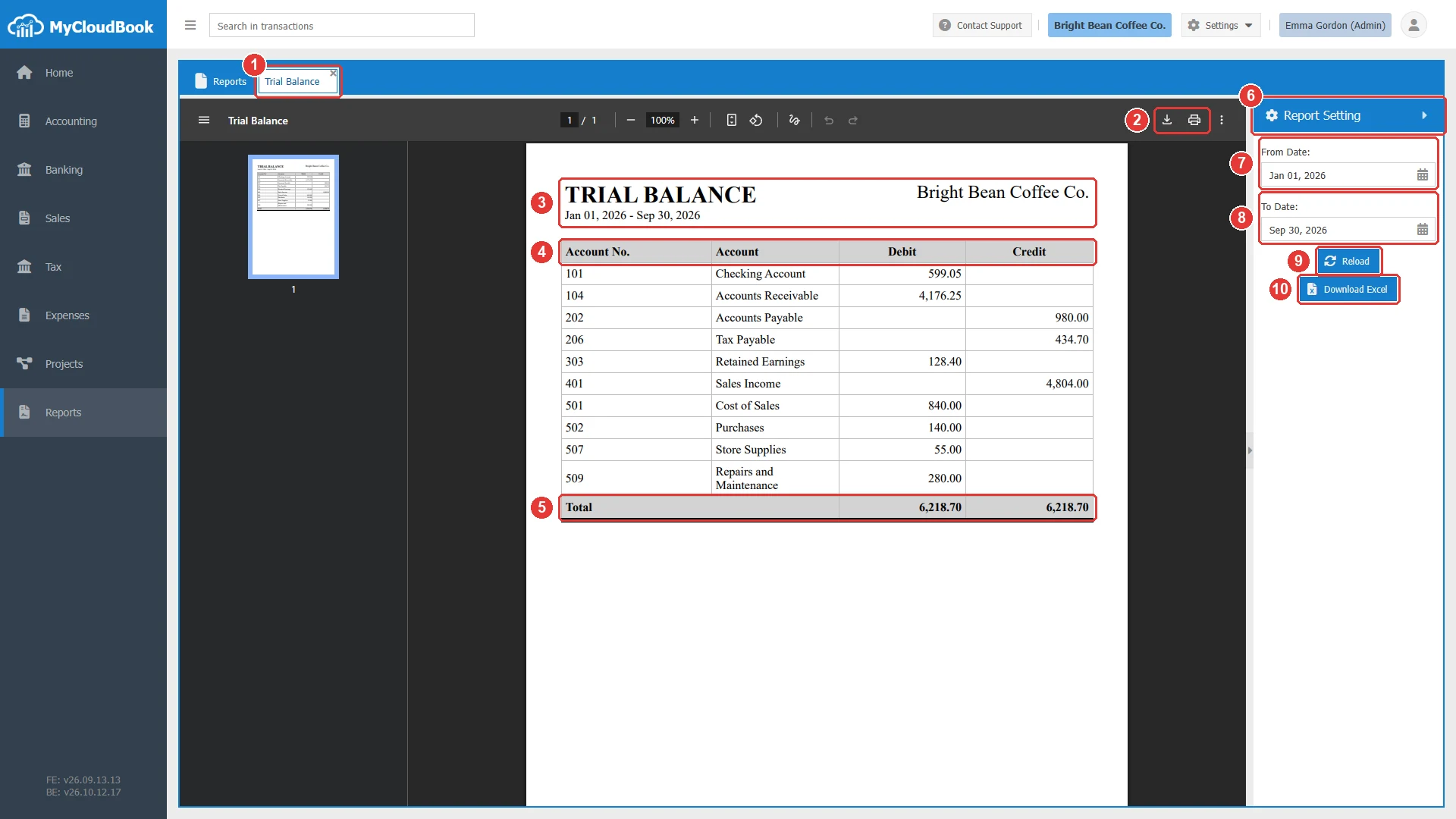
- 1The Trial Balance tab. The x closes it.
- 2The download and print buttons of the PDF viewer of the browser.
- 3The title of the report, TRIAL BALANCE, the period, and the name of the company.
- 4The columns Account No., Account, Debit, and Credit. One row for each account with a movement in the period.
- 5Total. The total of the Debit column and the total of the Credit column.
- 6Report Setting. The panel with the settings of the report.
- 7From Date. The first day of the period. It starts with January 1 of the current year.
- 8To Date. The last day of the period. It starts with today.
- 9Reload. Creates the report again with the settings of the panel.
- 10Download Excel. Downloads the report as the Excel file Trial Balance.xlsx.
The settings
| Field | Required | Purpose and rules |
|---|---|---|
| From Date | Required | The first day of the period. Both dates are part of the period. |
| To Date | Required | The last day of the period. |
How to read the report
| Rule | What it means |
|---|---|
| Movement of the period | Each amount is the sum of the posts of the account from the From Date to the To Date. The date of a post is the date of its document. |
| Debit or Credit | Asset and expense accounts show a net debit movement in the Debit column. Liability, equity, and income accounts show a net credit movement in the Credit column. A movement on the other side appears in the other column. Every row has one amount, and no amount is negative. |
| Rows | One row for each account with a movement in the period. An account without posts in the period, or with posts that add up to zero, is not listed. |
| Main accounts | A main account holds no posts, so it is not listed. Its sub accounts are listed with their own movements. |
| Order | The accounts are listed by type (assets, liabilities, equity, income, expenses), and then by account number. |
| Totals | The Total row adds the Debit column and the Credit column. The two totals are equal when every journal entry of the period is balanced. |
In the example, 101 Checking Account shows 599.05 in Debit: the money that came into the account from January to September, minus the money that went out. 401 Sales Income shows 4,804.00 in Credit: the sales of the period without sales tax. Both totals are 6,218.70.
To include every post since the start of the books, set the From Date to the first day of the records of the company, for example the date of the opening balances. Each balance sheet account then shows its balance on the To Date.
Choosing the period
- For one month, set the From Date to the first day and the To Date to the last day of the month.
- For the year to date, keep the default dates: January 1 of the current year to today.
- For a quarter, set the first day and the last day of the quarter, for example Jul 01, 2026 to Sep 30, 2026.
After each change, click Reload. The PDF document shows the period under the title.
Printing and Excel
- To print the report, click the print button of the PDF viewer. To keep it as a PDF file, click the download button of the PDF viewer.
- To work with the figures in a spreadsheet, click Download Excel. MyCloudBook creates the report with the settings of the panel and downloads it as Trial Balance.xlsx. The Excel file has the same rows, a header that stays visible, and a print setup with page numbers.
- The report shows the posted data at the moment of the Reload. After new documents are saved, click Reload again.
Messages and their meaning
Questions and answers
What does the Trial Balance of MyCloudBook show?
The net movement of every account between the From Date and the To Date, in the Debit or the Credit column, with the totals of the two columns.
Why is an account missing from the Trial Balance?
The account has no posts in the period, or its posts add up to zero. A main account is never listed: its sub accounts carry the amounts.
How do I see the balances of the accounts since the start of the books?
Set the From Date to the first day of the records of the company, for example the date of the opening balances, and click Reload. The Balance Sheet also shows the balances of the asset, liability, and equity accounts on a date.
Can I open the Trial Balance in Excel?
Yes. Click Download Excel. MyCloudBook downloads the report with the same period as Trial Balance.xlsx.
Where do I see the posts behind an amount?
Open the account in the Chart of Accounts. The Account Ledger lists every post of the account with its document.