Sales Tax Center
This guide explains the Sales Tax Center of MyCloudBook: the statement of the sales tax that the company owes to each tax agency, how each row and the balance are computed, and the Sales Tax Liability report.
Overview
The Sales Tax Center shows how much sales tax the company owes to each tax agency. A tax agency is the government office that collects a tax, for example a State Department of Revenue. The Sales Tax Center is the first tab of the Tax page.
The sales tax follows a simple path in MyCloudBook:
- The taxes, the tax groups, and the tax agencies are defined in Tax Settings.
- An invoice or a receipt line uses a tax or a tax group. When the document is saved, the tax of each tax is recorded in the Tax Payable account. Each tax keeps its own amount in this account.
- The Sales Tax Center adds the tax of the documents for each month, and shows the payments, the refunds, and the adjustments of the agency. The last column shows the balance that the company owes.
- When the company pays the agency, the payment is recorded with Record Tax Payment. A correction of the amount due is recorded with a tax adjustment.
The short video Sales Tax Made Simple shows the same steps from the setup of the taxes to the payment.
How to open the screen
- In the left navigation, click Tax. The Tax page opens with the Sales Tax Center tab.
- MyCloudBook selects the first tax agency in alphabetical order and shows its statement.
- To see another agency, select it in Tax Agency.
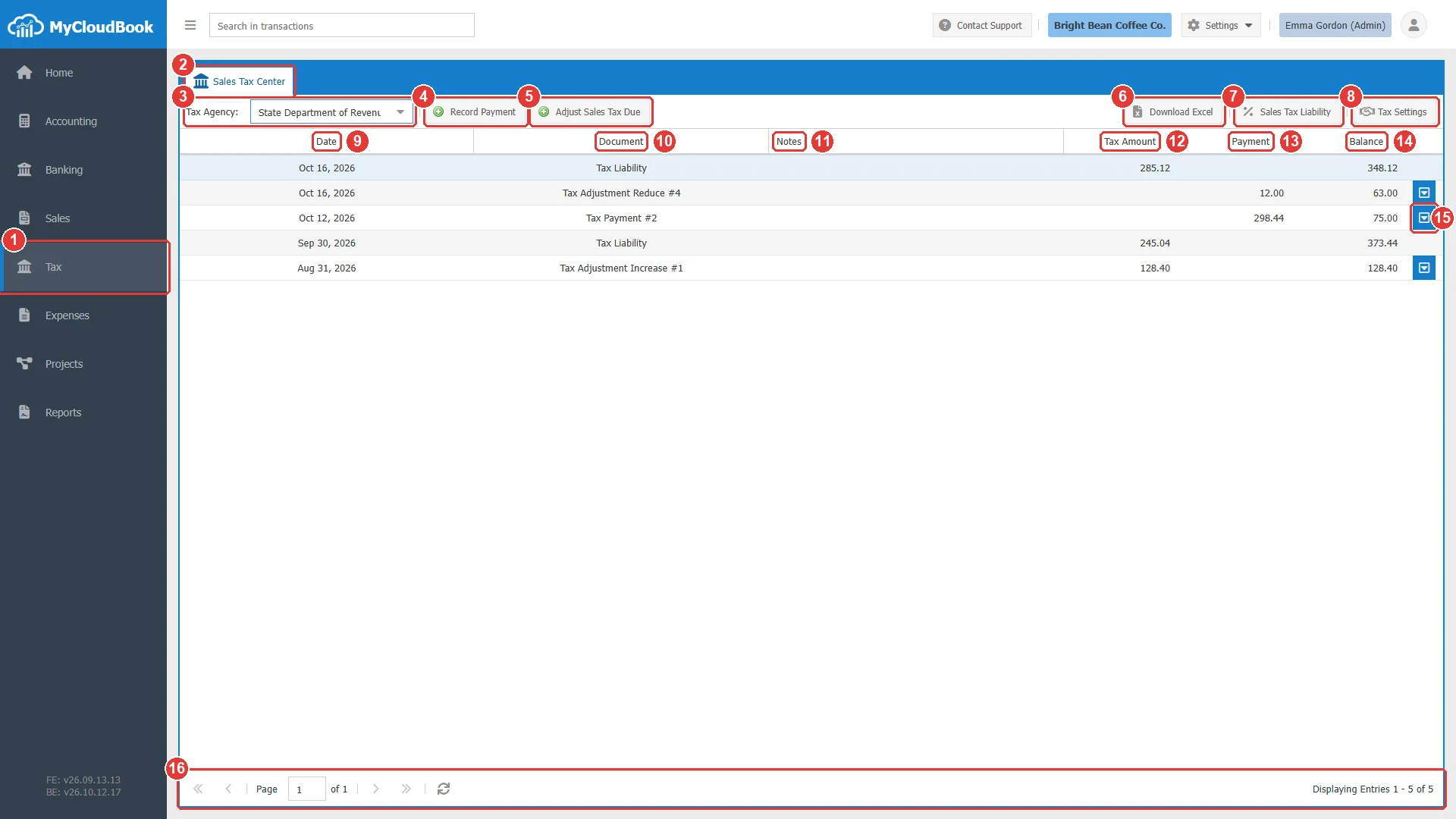
- 1Tax, in the left navigation.
- 2The Sales Tax Center tab. It is always the first tab of the Tax page.
- 3Tax Agency. The agency whose statement is shown.
- 4Record Payment. Records a payment to the agency, or a refund from the agency. See Record Tax Payment.
- 5Adjust Sales Tax Due. Increases or reduces the tax due. See Tax Adjustments.
- 6Download Excel. Downloads the statement of the agency as an Excel file.
- 7Sales Tax Liability. Opens the Sales Tax Liability report in a second tab.
- 8Tax Settings. Opens the window of the taxes, the tax groups, and the agencies. See Tax Settings.
- 9Date. The date of the row.
- 10Document. The type of the row and its number, for example Tax Payment #2.
- 11Notes.
- 12Tax Amount. The amounts that increase the tax due.
- 13Payment. The amounts that reduce the tax due.
- 14Balance. The tax due after the row. The balance of the first row is the amount that the company owes now.
- 15The row actions button. It is shown only on the payments, the refunds, and the adjustments.
- 16The paging bar with the number of rows.
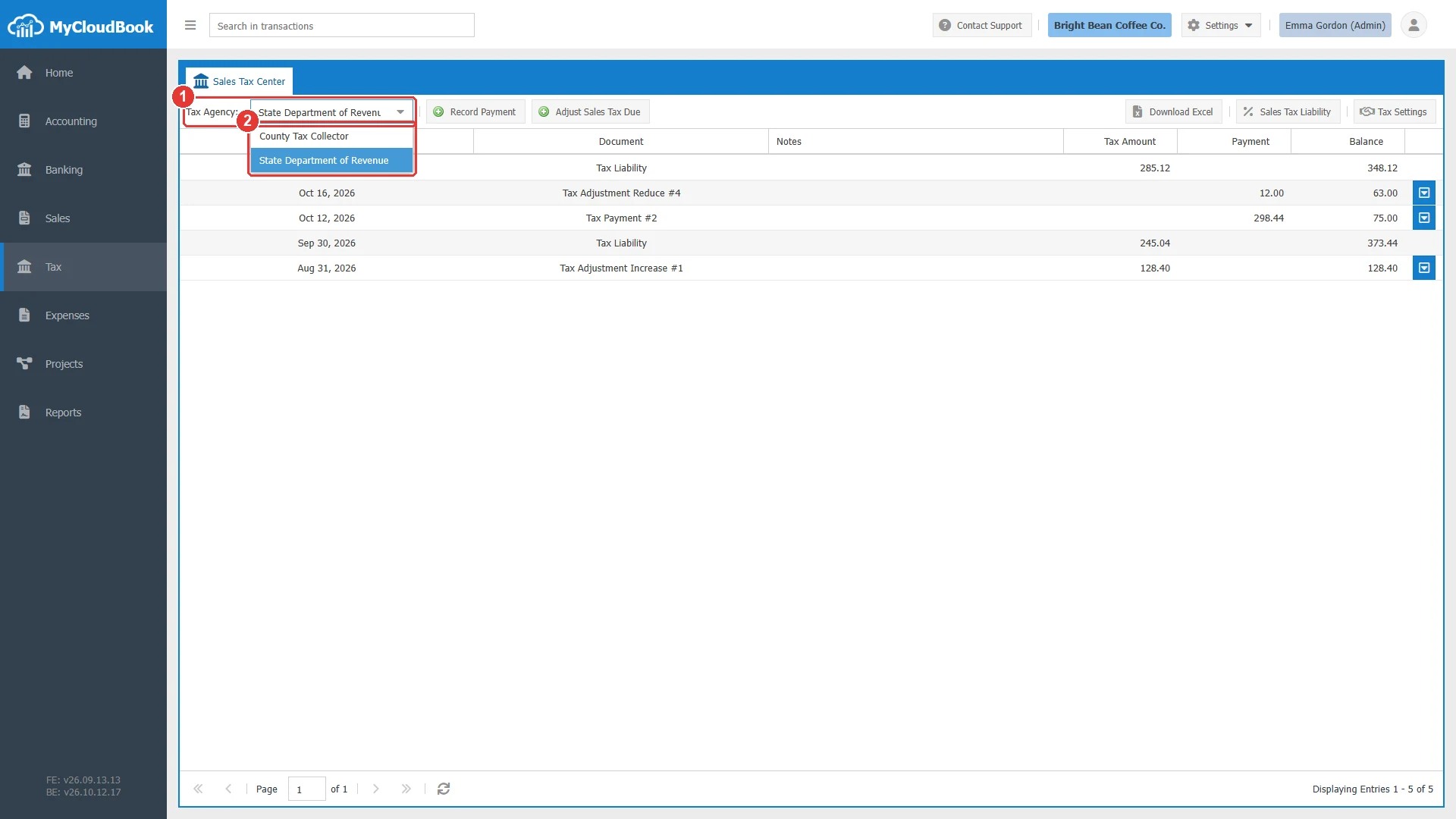
- 1Tax Agency.
- 2The agencies of the company, in alphabetical order. The statement shows the rows of one agency.
The statement of an agency
The statement lists the rows of one agency, newest first. On the same date, the Tax Liability row is shown above the other rows. The Balance column is a running total: MyCloudBook starts at the oldest row, adds the Tax Amount, and subtracts the Payment of each row. A positive balance is the tax that the company owes to the agency.
The row types
| Document | What the row contains |
|---|---|
| Tax Liability | The tax of all the invoices and receipts of one month, for all the taxes of the agency. The row of a past month has the date of the last day of that month. The row of the current month has the date of today. The amount is in the Tax Amount column. |
| Tax Payment #n | A payment to the agency. The amount is in the Payment column and reduces the balance. |
| Tax Refund #n | A refund from the agency. The amount is in the Tax Amount column and increases the balance. |
| Tax Adjustment Increase #n | An increase of the tax due. The amount is in the Tax Amount column. |
| Tax Adjustment Reduce #n | A reduction of the tax due. The amount is in the Payment column, because it lowers the balance like a payment. |
| Journal Entry #n | A journal entry with a line on the Tax Payable account for a tax of the agency. |
An example
The State Department of Revenue of the example company Bright Bean Coffee Co. has five rows. Read them from the bottom:
| Row | Effect on the balance |
|---|---|
| Aug 31, 2026: Tax Adjustment Increase #1, 128.40 | The unpaid August tax from the previous accounting system. Balance 128.40. |
| Sep 30, 2026: Tax Liability, 245.04 | The State tax of the invoices and receipts of September. Balance 373.44. |
| Oct 12, 2026: Tax Payment #2, 298.44 | The payment of the September return. Balance 75.00. |
| Oct 16, 2026: Tax Adjustment Reduce #4, 12.00 | A correction: the August amount was 12.00 too high. Balance 63.00. |
| Oct 16, 2026: Tax Liability, 285.12 | The State tax of October up to today. Balance 348.12, the amount due now. |
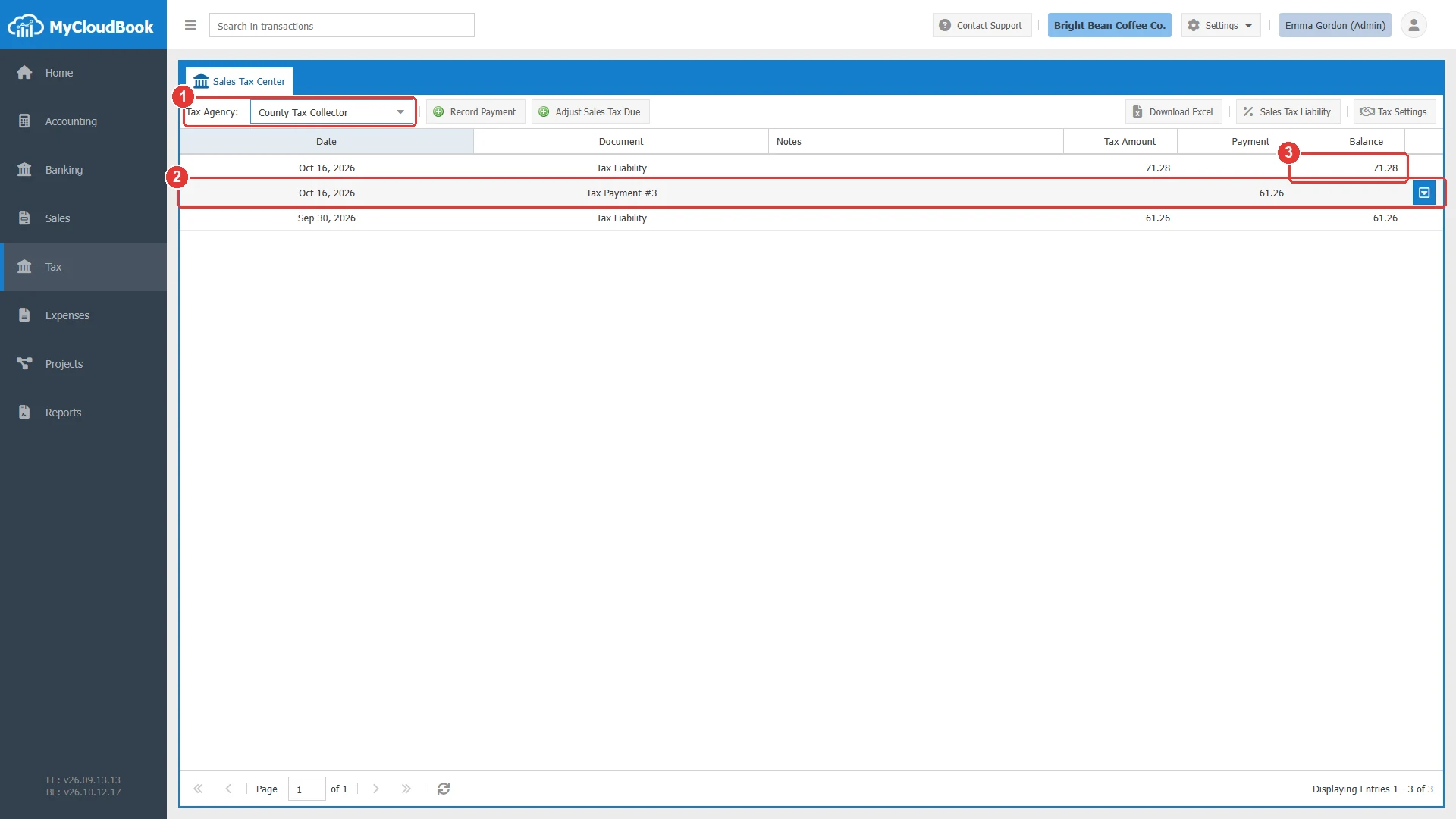
- 1Tax Agency: County Tax Collector.
- 2Tax Payment #3 paid the September tax of 61.26, so the balance became 0.00.
- 3The balance due now: the County tax of October, 71.28.
What the statement includes
The statement of an agency includes:
- the tax of invoices and receipts, added for each month;
- the tax payments, tax refunds, and tax adjustments of the agency;
- journal entries with a line on the Tax Payable account for a tax of the agency.
Bills and expenses do not record sales tax, so they are not part of the statement.
Changing and deleting a row
The payments, the refunds, and the adjustments have a row actions button. The Tax Liability rows have no button, because MyCloudBook computes them from the documents. To change a Tax Liability row, change the invoice or the receipt.
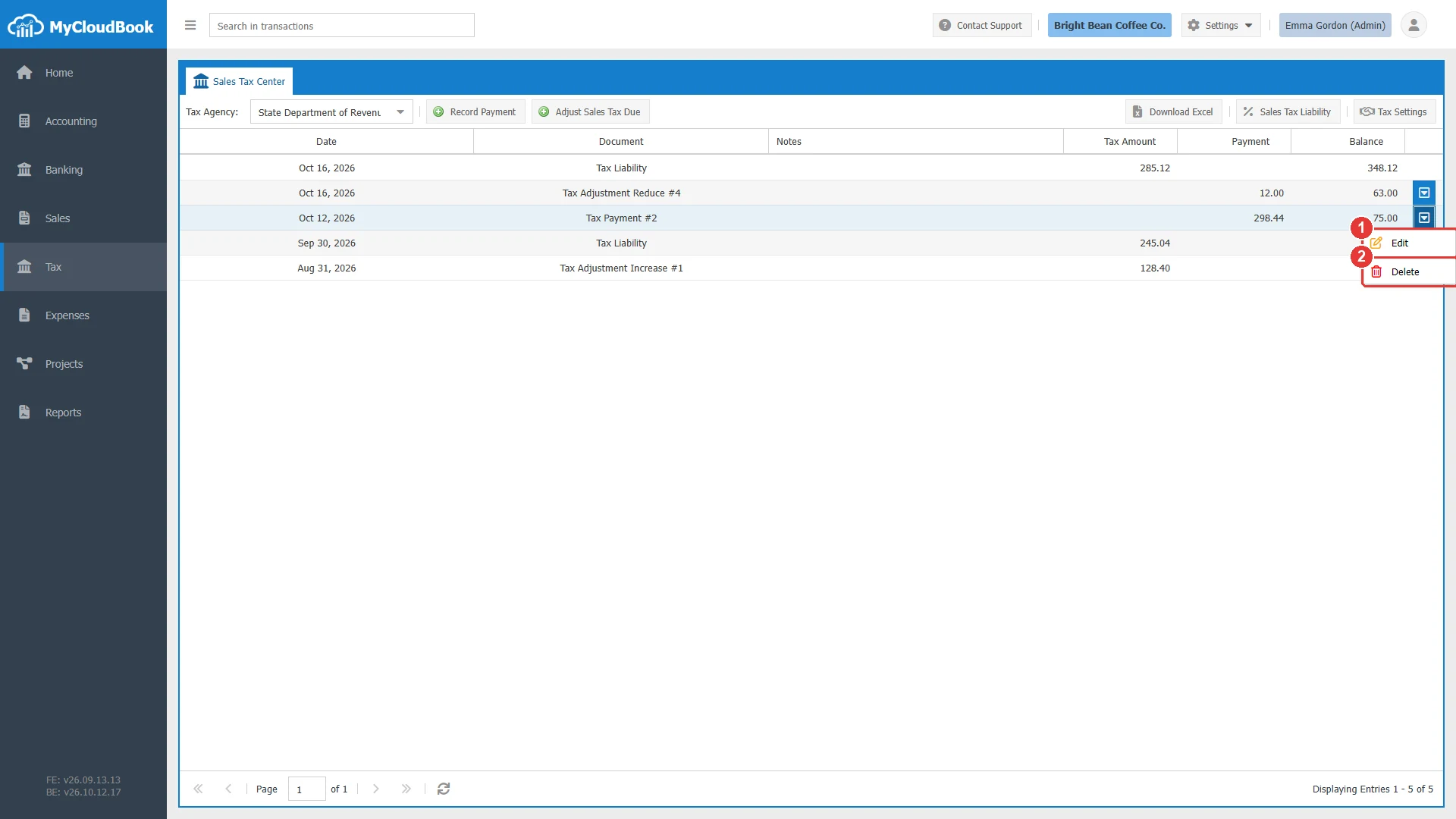
- 1Edit. Opens the payment, the refund, or the adjustment in its window. A double click on the row does the same.
- 2Delete. Deletes the document and its journal entry after a confirmation.
The delete is permanent. A document whose bank post is reconciled in Banking cannot be deleted until the bank transaction is unreconciled.
Download Excel
Download Excel downloads the statement of the selected agency. The file name is the name of the agency followed by -Sales Tax Statement.xlsx, for example State Department of Revenue-Sales Tax Statement.xlsx.
- Row 1 has the title Sales Tax Statement - and the agency name. Row 2 has the date and the time of the file.
- Row 4 has the columns Date, Document, Notes, Tax Amount, Payment, and Balance.
- The rows are listed oldest first, in the opposite order of the screen. The amounts are numbers, so they can be added in Excel.
The Sales Tax Liability report
The Sales Tax Liability report lists the taxable sales and the tax of each tax for a period. It is the usual basis of a sales tax return. Open it with Sales Tax Liability in the Sales Tax Center, or with the item Sales Tax Liability of the Reports page. The report opens in its own tab.
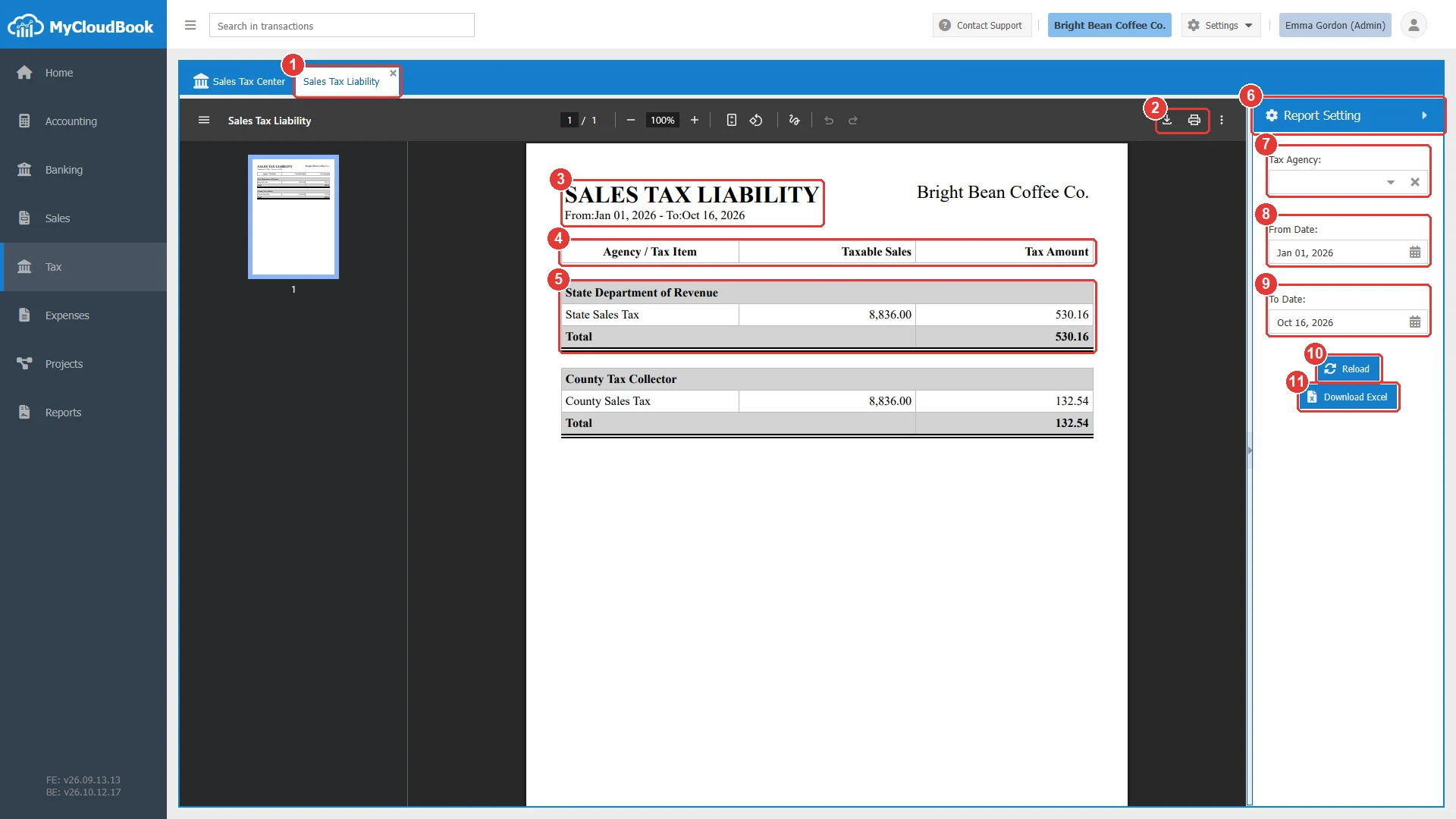
- 1The Sales Tax Liability tab. It can be closed.
- 2The download and print buttons of the PDF viewer of the browser.
- 3The title and the period of the report.
- 4The columns Agency / Tax Item, Taxable Sales, and Tax Amount.
- 5One block for each agency: the agency name, one row for each tax, and the total of the agency.
- 6Report Setting. The panel can be collapsed and resized.
- 7Tax Agency. Leave it empty to see all the agencies.
- 8From Date. The default is January 1 of the current year.
- 9To Date. The default is today.
- 10Reload. Builds the report again with the selected values. Click it after you change a filter.
- 11Download Excel. Downloads the same data as Sales Tax Liability.xlsx.
The report reads the invoices and the receipts whose date is in the period:
- Taxable Sales is the total of the lines that use the tax, in the main currency.
- Tax Amount is the tax of these lines.
- A line with a tax group counts for each tax of the group.
- The report has a total for each agency.
The report shows the tax of the period. The payments and the balance of an agency are shown in the statement.
Messages and their meaning
Questions and answers
Where do I see how much sales tax I owe in MyCloudBook?
Open Tax in the left navigation and select the tax agency in Tax Agency. The Balance of the first row of the Sales Tax Center is the amount that the company owes to that agency now.
Why is there one Tax Liability row for each month?
MyCloudBook adds the tax of all the invoices and receipts of a month into one row. The row of a past month has the date of the last day of the month, and the row of the current month has the date of today.
How do I print the statement of a tax agency?
Select the agency and click Download Excel. MyCloudBook downloads the statement as an Excel file, which you can print. The Sales Tax Liability report opens as a PDF, which you can print from the PDF viewer.