Tax Adjustments
This guide explains how to increase or reduce the sales tax that the company owes to a tax agency in MyCloudBook, for example for an opening balance or a correction.
Overview
A tax adjustment changes the sales tax that the company owes to a tax agency when no invoice, receipt, or payment explains the change. An adjustment has one of two types:
- Increase (Tax Adjustment Increase): the tax due becomes higher;
- Reduce (Tax Adjustment Reduce): the tax due becomes lower.
Typical adjustments are the unpaid tax that is carried over from a previous accounting system, and the correction of an amount that was recorded too high or too low. Each adjustment names the other account of the entry, the adjustment account, and the amount of each tax of the agency.
How to open the screen
- In the left navigation, click Tax.
- In Tax Agency, select the agency of the tax.
- Click Adjust Sales Tax Due. The Sales Tax Adjustment window opens with the active taxes of that agency.
The window always uses the agency that was selected in the Sales Tax Center.
Recording an adjustment
In the example, the August tax that was carried over from the previous accounting system was 12.00 too high. The adjustment reduces the State Sales Tax by 12.00.
- Select the Type: Increase or Reduce.
- Select the Adjustment Account, here 303 Retained Earnings, the account of the old balances.
- Check the Adjustment Date, and type the reason in Notes.
- In the Adjustment Amount column, type the amount of each tax. A tax without an amount stays at 0.
- Click Save. The window closes, and the Sales Tax Center shows the adjustment.
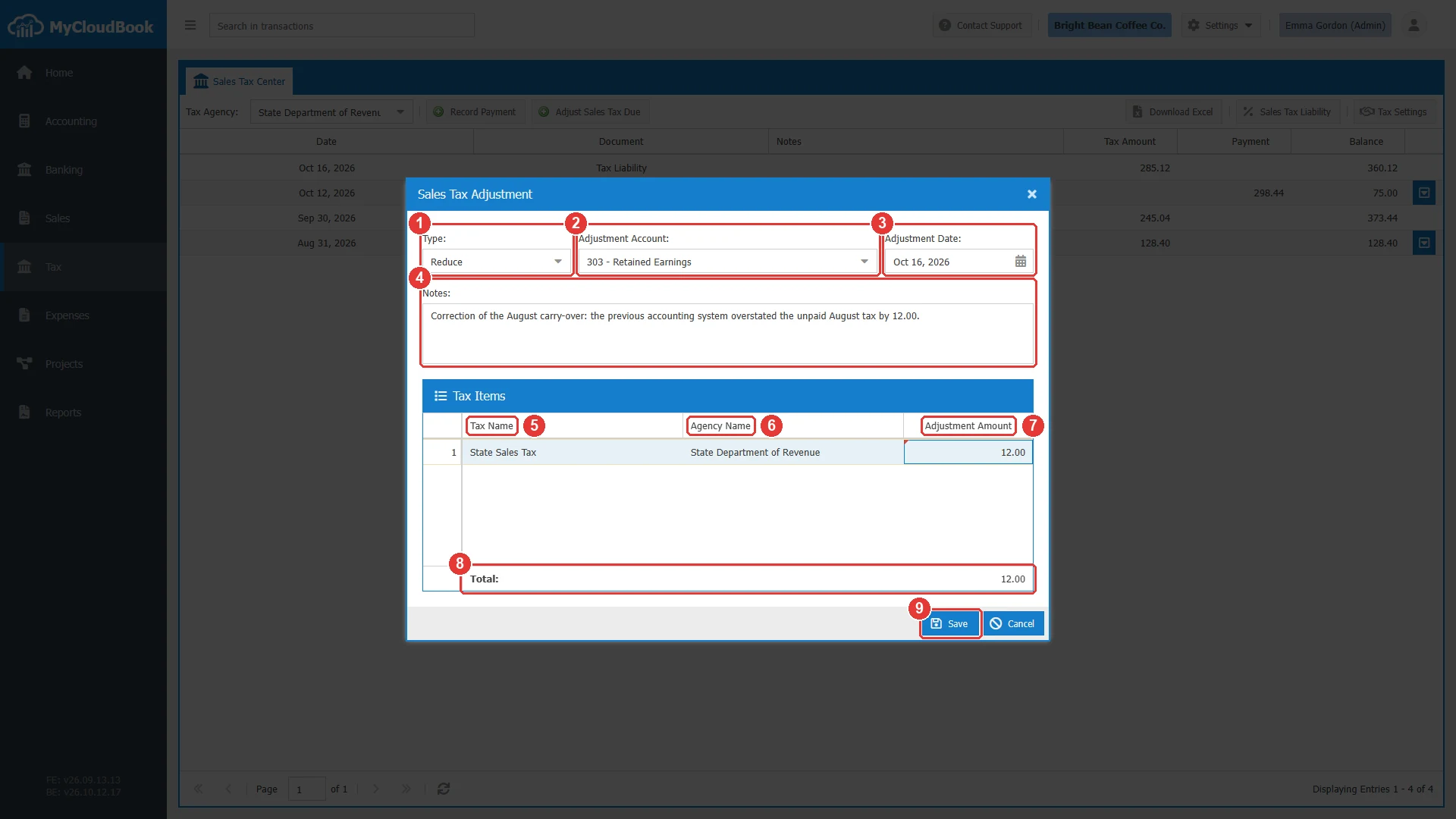
- 1Type: Increase or Reduce.
- 2Adjustment Account. Required. The other account of the entry.
- 3Adjustment Date. Required. The default is today.
- 4Notes. Optional, up to 2000 characters.
- 5Tax Name. One row for each active tax of the agency.
- 6Agency Name.
- 7Adjustment Amount. Type the amount. A click on the cell opens it.
- 8The total of the adjustment.
- 9Save.
The fields
| Field | Required | Purpose and rules |
|---|---|---|
| Type | Required | Increase or Reduce. The default is Increase. |
| Adjustment Account | Required | An asset, liability, or equity account. A main account cannot be used. Select one of its sub-accounts. The account must be in the main currency. |
| Adjustment Date | Required | The date of the adjustment. Any date is accepted. |
| Notes | Optional | Up to 2000 characters. |
| Adjustment Amount | Required | 0 or more for each tax. The total must be more than 0. |
What the adjustment records
The adjustment gets the next number of the tax documents. The payments, the refunds, and the adjustments share one number sequence, so the reduction of the example is Tax Adjustment Reduce #4.
| Type | Journal entry |
|---|---|
| Increase | Debit: the Adjustment Account, with the total. Credit: Tax Payable, one line for each tax with an amount. |
| Reduce | Debit: Tax Payable, one line for each tax with an amount. Credit: the Adjustment Account, with the total. |
In the example company, Tax Adjustment Increase #1 recorded the unpaid August tax: debit 303 Retained Earnings 128.40, credit Tax Payable 128.40 for the State Sales Tax. Tax Adjustment Reduce #4 corrected it: debit Tax Payable 12.00, credit 303 Retained Earnings 12.00.
In the Sales Tax Center, an increase is shown in the Tax Amount column, and a reduction in the Payment column, because it lowers the balance like a payment.
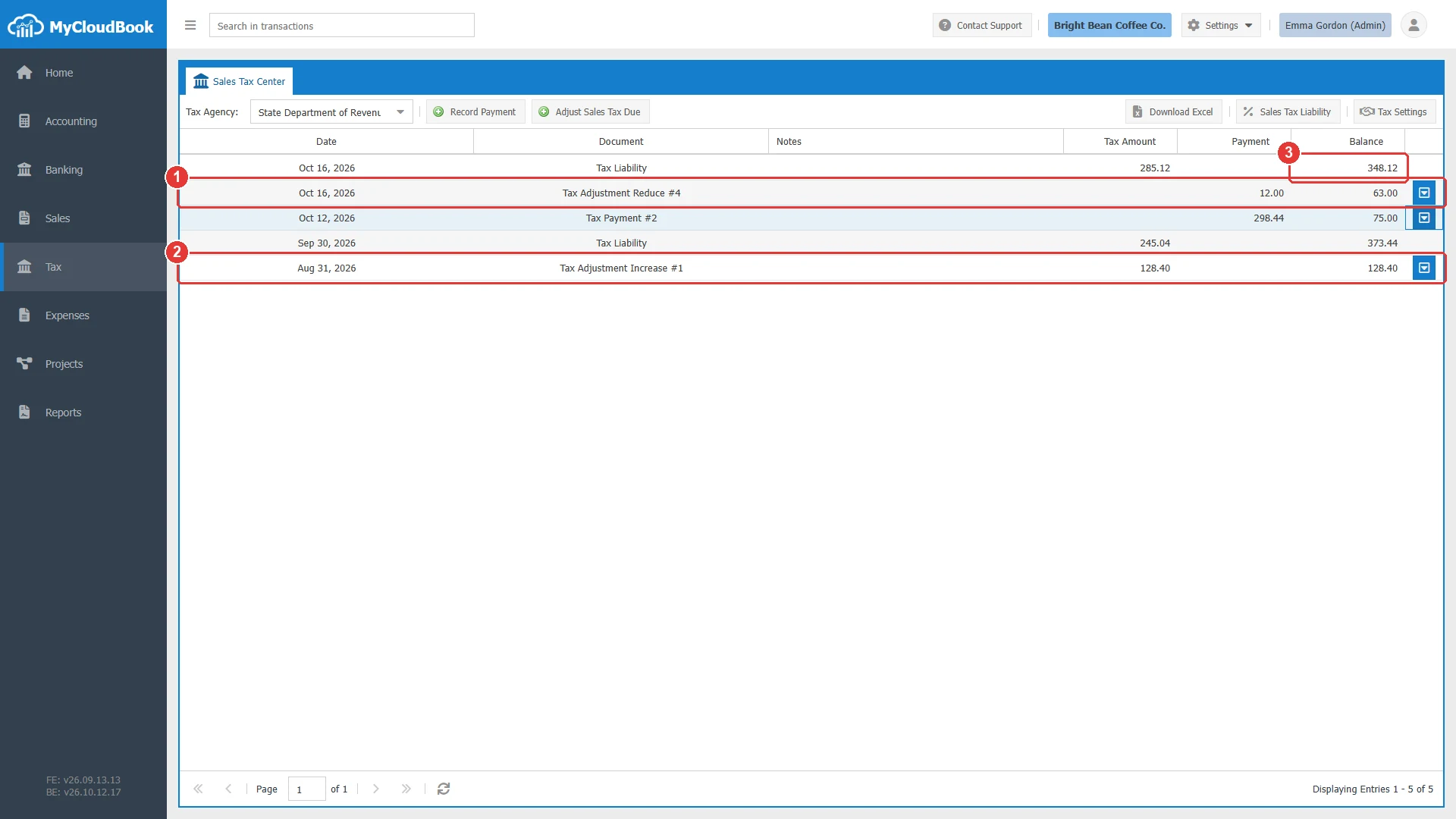
- 1Tax Adjustment Reduce #4: 12.00 in the Payment column.
- 2Tax Adjustment Increase #1: 128.40 in the Tax Amount column.
- 3The balance due after all the rows.
Changing and deleting an adjustment
To open an adjustment, double click its row in the Sales Tax Center, or use Edit in the row actions menu. The window title shows the type and the number, for example Tax Adjustment Increase #1.
- You can change the type, the account, the date, the notes, and the amounts. You cannot add or remove a tax.
- The journal entry is updated with the adjustment. The number does not change.
- When the adjustment account is a bank account whose post is reconciled in Banking, the account and the amount cannot change, and the adjustment cannot be deleted.
To delete an adjustment, use Delete in the row actions menu. The delete removes the adjustment and its journal entry, and cannot be undone.
Messages and their meaning
Questions and answers
How do I enter an opening sales tax balance in MyCloudBook?
Open the Sales Tax Center, select the agency, and click Adjust Sales Tax Due. Select Increase, an equity account such as Retained Earnings, the date of the opening balance, and the amount of each tax.
How do I correct a tax amount that is too high?
Record a Reduce adjustment for the agency with the amount of the difference, and explain the reason in Notes.
Why is my reduction in the Payment column?
A reduction lowers the tax due like a payment. The Sales Tax Center shows every amount that lowers the balance in the Payment column.