SMTP Configuration
This guide explains the SMTP Configuration of MyCloudBook: how to connect the mail server of the company, so MyCloudBook can send the documents by email.
Overview
MyCloudBook sends the emails of the company through the mail server of the company. The Simple Mail Transfer Protocol (SMTP) is the standard way to send email through such a server. The SMTP Configuration window holds the address of the server, the sign in data of the mailbox, and the sender that the customers see.
MyCloudBook uses the configuration for these emails:
- the documents that a user sends with the Send button, for example invoices, receipts, estimates, and statements. See Invoices and Receipts;
- the emails that confirm the online payments of the Stripe Integration.
Set up the configuration before the first document is sent by email. The answers of the customers go to the From Email address.
How to open the window
- In the top bar, click Settings. The button is between the name of the company and the name of the user.
- In the menu, click SMTP configuration. The window SMTP Configuration opens.
The Settings menu is shown to the users with the Admin role. The other users do not see the menu.
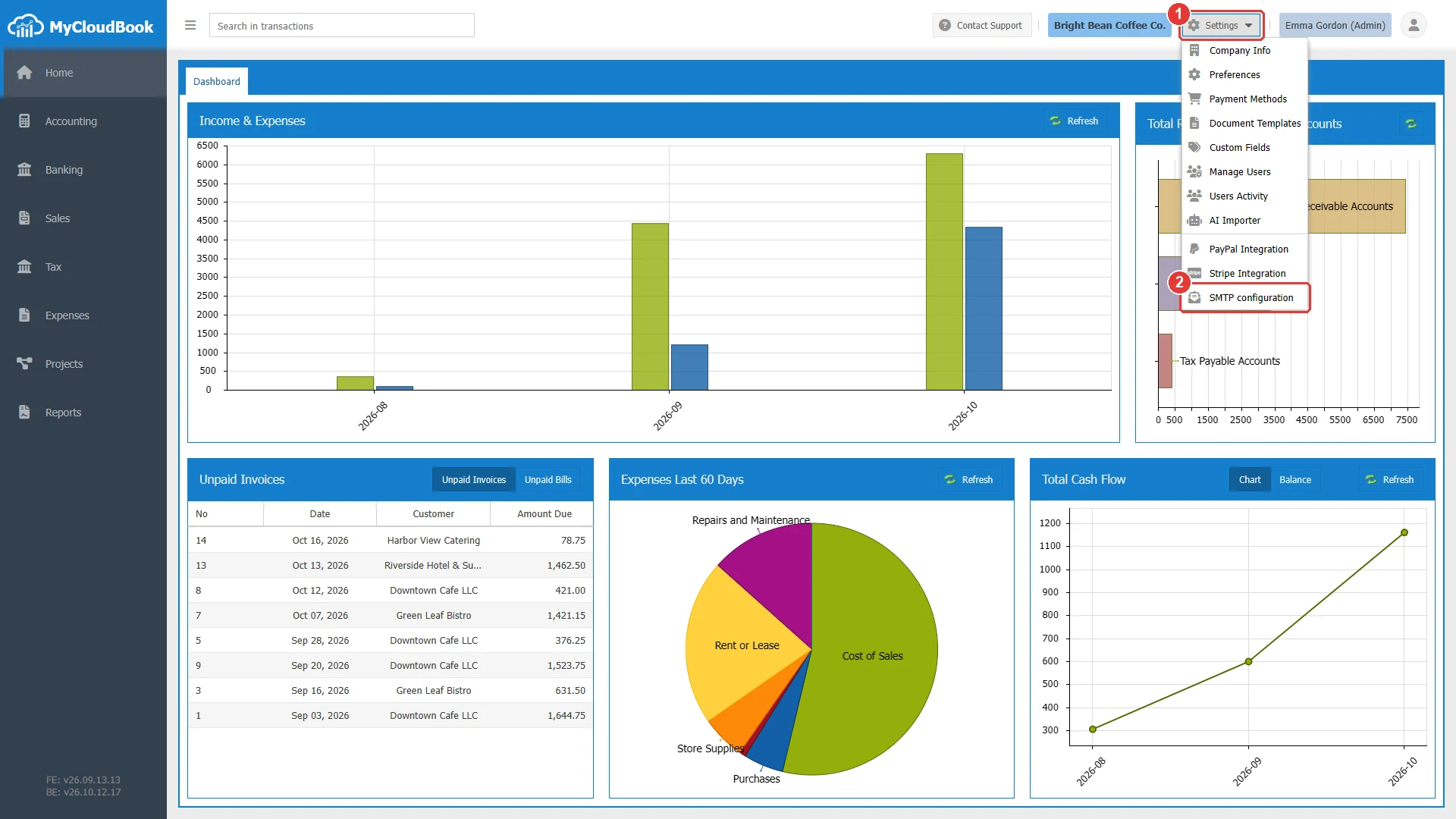
- 1Settings. Opens the menu of the company settings.
- 2SMTP configuration.
The SMTP Configuration window
The window has two groups: Server Settings and Email Settings. The example shows fictional values of a mail server on port 587.
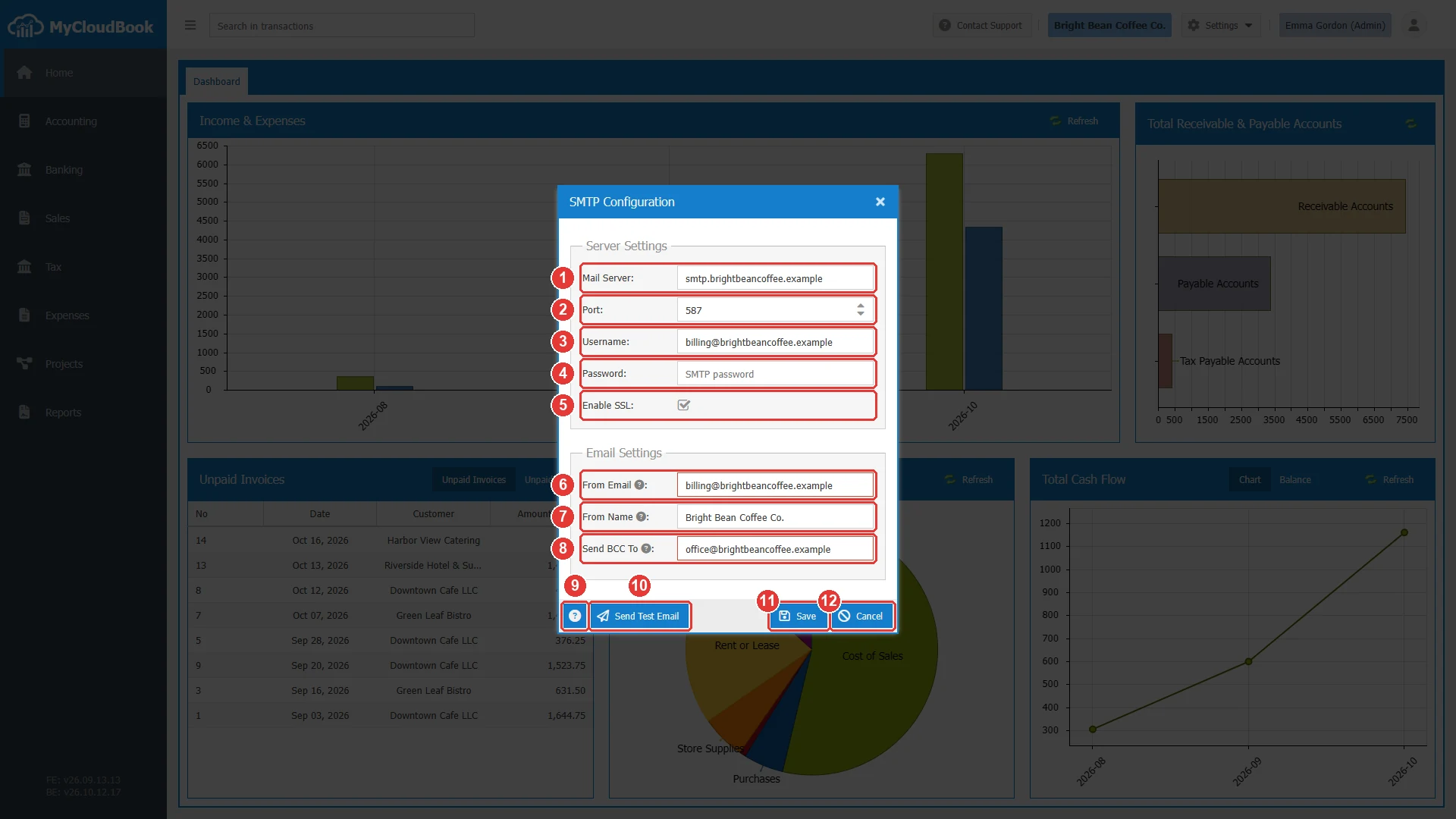
- 1Mail Server. Required.
- 2Port. Required. It starts with 587.
- 3Username. Required.
- 4Password. Required. The characters are hidden.
- 5Enable SSL. An encrypted connection to the server.
- 6From Email. Required. The sender address.
- 7From Name. Required. The sender name.
- 8Send BCC To. Optional. A copy of every email goes to this address.
- 9Help. Opens the settings of common mail services.
- 10Send Test Email. Sends a test email with the values of the window.
- 11Save.
- 12Cancel.
| Field | Required | Purpose and rules |
|---|---|---|
| Mail Server | Required | The address of the SMTP server, for example smtp.gmail.com. The mail service of the company gives this address. |
| Port | Required | A number from 1 to 65535. Most services use 587 for an encrypted connection. |
| Username | Required | The sign in name of the mailbox, usually its email address. |
| Password | Required | The password of the mailbox. Some services, such as Gmail, need an app password instead of the normal password. |
| Enable SSL | Optional | Check it for an encrypted connection. Gmail, Outlook, and Yahoo need it on port 587. |
| From Email | Required | The sender address of the emails, and the address of the answers. Use an address of the mailbox. |
| From Name | Required | The sender name that the customers see, for example the name of the company. |
| Send BCC To | Optional | A hidden copy (blind carbon copy, BCC) of every outgoing email goes to this address. Use it, for example, for the records of the company. |
Testing and saving the configuration
- Fill in the fields.
- Click Send Test Email. MyCloudBook sends the email Test Email with the values of the window to the From Email address. The values do not need to be saved first.
- Check the mailbox of the From Email address.
- When the test email arrived, click Save.
When the server refuses the connection, the message starts with SMTP connection Error: and shows the answer of the server. Check the server, the port, Enable SSL, the username, and the password, and send the test again.
The settings of common mail services
The help button opens the settings of common mail services.
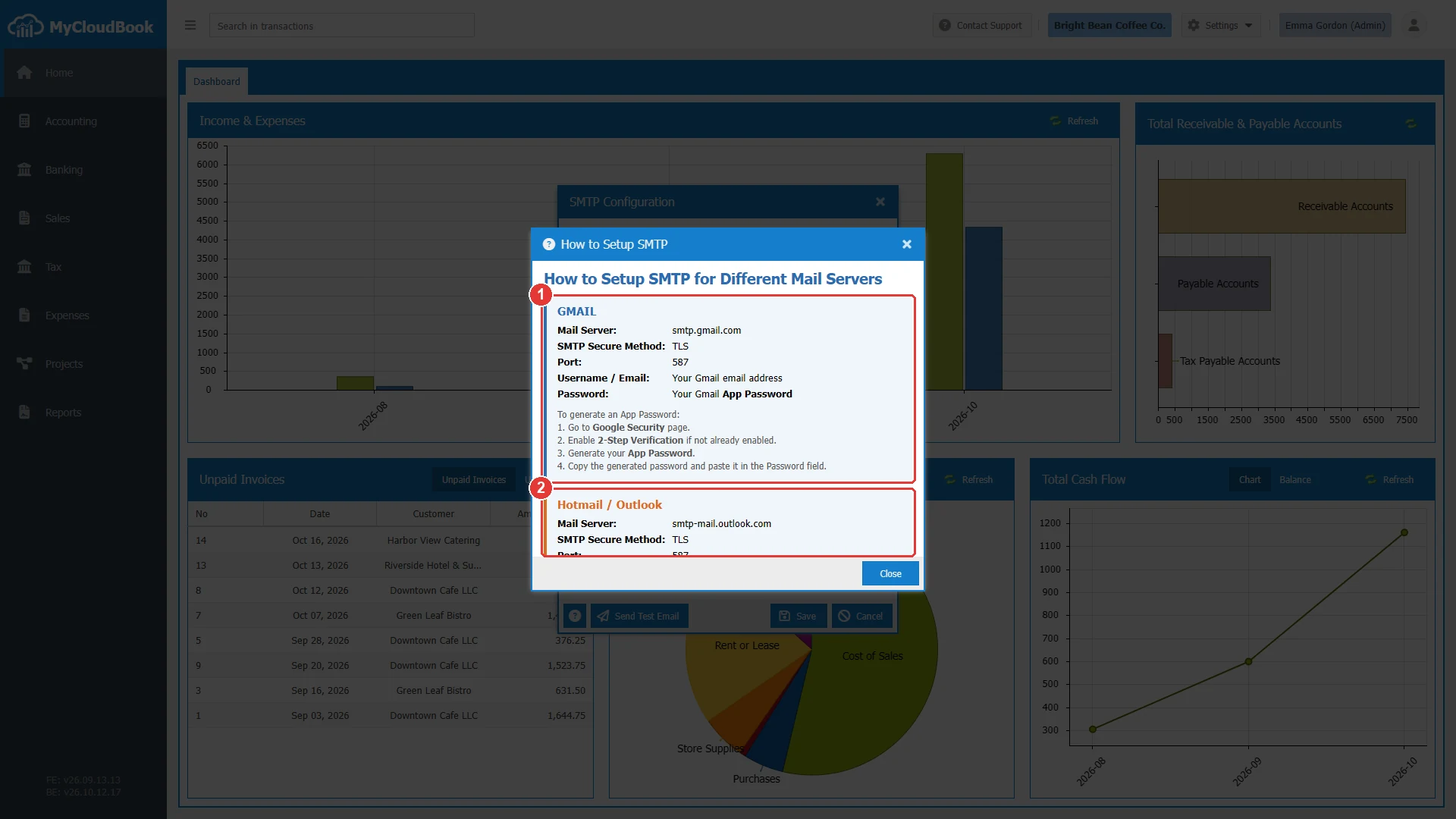
- 1Gmail, with the steps to create an app password.
- 2Hotmail and Outlook. The window also lists Yahoo and other servers below.
| Service | Mail Server, port, and sign in |
|---|---|
| Gmail | smtp.gmail.com, port 587, Enable SSL checked. The username is the Gmail address, and the password is an app password of the Google account (2-Step Verification must be on). |
| Hotmail and Outlook | smtp-mail.outlook.com, port 587, Enable SSL checked. The username is the email address. |
| Yahoo | smtp.mail.yahoo.com, port 587, Enable SSL checked. The username is the email address. |
| Other servers | The server and the port of the mail service, often 587 with an encrypted connection. |
Messages and their meaning
Questions and answers
Why does MyCloudBook use the mail server of the company?
The emails then come from the address of the company, and the answers of the customers go to the mailbox of the company. Set up the configuration before the first document is sent by email.
Which port should I use?
Use the port that the mail service gives. Most services, such as Gmail, Outlook, and Yahoo, use port 587 with Enable SSL checked.
Where does the test email go?
To the From Email address. Check that mailbox after you click Send Test Email.
Can I keep a copy of every email that MyCloudBook sends?
Yes. Type an address in Send BCC To. A hidden copy of every outgoing email goes to that address.
Which password do I use for Gmail?
An app password of the Google account. Turn on 2-Step Verification, create the app password in the security settings of Google, and paste it into the Password field.